Hello Everyone!
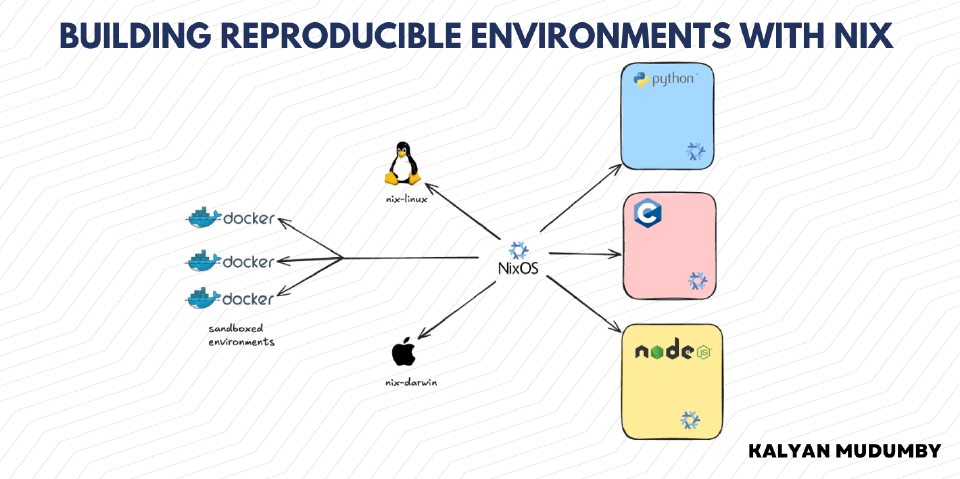
I’ve been running NixOS for a little over a year now, across two Linux machines and a MacBook. What I wanted from it wasn’t reproducible packaging, which is what Nix usually gets sold on. It was the ability to change a working system without losing track of what I’d done to it.
On a machine I’d been running for a couple of years I could have told you roughly what I installed on purpose, and almost nothing about what arrived as a dependency, what I removed and left half configured, or which of the several files configuring my shell actually won. Nothing was broken. But I couldn’t predict what a given change would do, so I stopped making them, which is a slow way to end up on a stale machine.
Nix solves this with four mechanisms that tend to get discussed separately.
They solve four different problems, and most of the skill is knowing which one a given question needs.
Declarative Configuration#
On most distributions, installing a package is an event. It happens, it changes the disk, and afterwards the only record is the result. In Nix you describe the state you want and the system gets built to match it, so running the build twice produces the same thing and deleting a line removes the package. Nothing can be present on the machine without appearing in a file you wrote, which makes those files a complete description of the machine rather than a partial one.
The unit of this is a flake, a directory containing a flake.nix that declares inputs, the external things it depends on, and outputs, the things it produces. Close to the smallest useful one for a single machine looks like this.
{
  description = "A minimal system flake";

  inputs = {
    nixpkgs.url = "github:NixOS/nixpkgs/release-25.11";

    home-manager = {
      url = "github:nix-community/home-manager/release-25.11";
      inputs.nixpkgs.follows = "nixpkgs";
    };
  };

  outputs =
    { nixpkgs, home-manager, ... }:
    {
      nixosConfigurations.myHost = nixpkgs.lib.nixosSystem {
        system = "x86_64-linux";
        modules = [
          ./configuration.nix
          home-manager.nixosModules.home-manager
        ];
      };
    };
}
Two details in there are what make a flake reproducible rather than just tidy.
Inputs get pinned. Nix generates a flake.lock next to flake.nix recording the exact git revision of every input, and once that file is committed the flake evaluates to the same thing next year as it does today. Without it release-25.11 is a moving target.
inputs.nixpkgs.follows = "nixpkgs" makes home-manager use our nixpkgs instead of pinning its own. By default each input carries its own copy, so a flake with four inputs can pull in four slightly different nixpkgs trees and you end up with two versions of the same library in one closure. follows collapses that graph.
flowchart TD
    subgraph ins["inputs"]
        NPKGS["nixpkgs
release-25.11"]
        HM["home-manager"]
        OTHER["other flakes"]
    end

    HM -.->|follows| NPKGS
    OTHER -.->|follows| NPKGS

    ins --> FLAKE["flake.nix"]
    LOCK["flake.lock"] -.->|"pins revisions"| FLAKE

    FLAKE --> OUT["nixosConfigurations.myHost"]
    OUT --> MODS["modules list"]
    MODS --> SYS["built system"]
The lockfile fixes what the inputs resolve to, and follows keeps them all resolving to one nixpkgs.
Modules and options#
The modules list is where the system actually gets described. A module is a function returning an attribute set, and modules compose; two of them can both set environment.systemPackages and Nix merges the results, which is what lets a system be split into reusable pieces without them overwriting each other.
To make a piece of configuration optional, declare an option with lib.mkEnableOption and guard the configuration with lib.mkIf.
{ pkgs, lib, config, ... }:
{
  options.desktop.niri.enable = lib.mkEnableOption "Niri Desktop";

  config = lib.mkIf config.desktop.niri.enable {
    programs.niri.enable = true;
    security.polkit.enable = true;

    environment.systemPackages = with pkgs; [
      alacritty
      waybar
    ];
  };
}
Anything importing that module now has a desktop.niri.enable switch. These options are typed and discoverable, and a mistyped one gives you a clear error rather than a confusing one, which is reason enough to use the module system instead of inventing a private convention on top of it.
Keeping the configuration in git#
/etc/nixos is where NixOS reads the system definition from, so point it at a git repository.
sudo ln -s ~/nixos /etcThere is now no version of the configuration on the machine that is separate from the version in the repo. No export step, no install.sh copying files into place and drifting away from what is running, which is how every dotfiles repo I’ve kept eventually died. Editing the system and editing the repo are the same act, and the next section depends entirely on that.
Version Control#
NixOS gives us generations. Every nixos-rebuild switch produces a new one, old ones stay on disk, and they all appear in the boot menu.
boot.loader.systemd-boot = {
  enable = true;
  configurationLimit = 14;
};
If a rebuild breaks the machine, reboot, pick the previous entry, done. That covers rollback of state, and state is where it stops. Generation 213 is a binary artifact; it can be booted but not read, and it tells you nothing about why it differs from 214. Rolling back doesn’t tell you what to do next, and editing the configuration afterwards loses the rollback anyway.
Git covers rollback of intent, which is what debugging needs. Because the system is text, a commit records why a change seemed like a good idea and a revert records that it wasn’t.
flowchart TD
    EDIT["edit the configuration"]

    EDIT --> COMMIT["git commit"]
    EDIT --> BUILD["nixos-rebuild switch"]

    BUILD --> G214["generation 214"]
    G214 --> G213["generation 213"]
    G213 --> G212["generation 212"]

    COMMIT --> C3["switch to LTO kernel"]
    C3 --> C2["earlier commit"]
    C2 --> C1["earlier commit"]

    G213 -->|"boot menu"| FIX["a working machine again"]
    C3 -->|"git log"| WHY["why it broke, months later"]
The same edit produces two histories. Generations recover the machine, commits recover the reason.
I switched to a LTO (Link Time Optimization) kernel build once and it broke out of tree kernel modules on my laptop. The generation rollback fixed the machine that evening. The commit, system: revert to non-lto kernel to enable modules, is what stops me doing it again next year, because a git log on that file returns the reason. Without it the fact sits in my memory for four months and then I rediscover it.
There are ten reverts in my history. Each one is a change I made deliberately, hit something, and undid, and the pair of commits records both halves. A couple of them contradict each other because I changed my mind about how much risk I wanted to carry, which is more useful to me than a tidied up history would be.
Two things follow from this that are easy to miss.
git bisect now works on an operating system. If battery life got worse over the last two months, that’s a bisect across a few dozen commits, each of which builds a bootable machine.
And flake.lock is what keeps the history buildable. Checking out an old commit brings the lockfile with it, so you get the exact inputs from that date and not just your intentions. A three month old commit still produces the same system.
The workflow is unremarkable, which is the point.
git checkout -b try-new-kernelsudo nixos-rebuild switch --flake /etc/nixos#myHostBranch, rebuild, use the machine for a week. Good, merge it. Bad, git checkout main, rebuild, and the branch stays as a record of the attempt.
Ephemeral Environments#
A rebuild takes minutes, produces a generation, and touches the whole system, which is more than most experiments need. This part of Nix has nothing to do with your system configuration at all.
Say a project needs a Rust toolchain and this machine has none.
nix shell nixpkgs#cargo nixpkgs#rustcThat gives us a subshell with cargo and rustc on PATH. Nothing was installed, no generation was created, and the configuration repo is untouched. Exit the shell and they leave PATH; the store paths remain as cache until the next garbage collection.
nix.gc.options = "--delete-older-than 7d";For a single invocation we don’t need the shell at all.
nix run nixpkgs#cowsay -- helloVersions are part of the attribute path, so nixpkgs#nodejs_22 and nixpkgs#nodejs_20 are different things and two projects on different Node majors are two different commands, with no version manager and no shell hook holding global state.
nix shell nixpkgs#nodejs_22It’s the same attribute whether it appears as pkgs.nodejs_22 in a module or nixpkgs#nodejs_22 on the command line, so promoting something from a shell you keep typing to a package you install is a one line diff.
Per project environments#
nix develop reads a devShells output and gives us a shell holding one project’s dependencies. This goes in the project repo and gets committed.
{
  inputs.nixpkgs.url = "github:NixOS/nixpkgs/release-25.11";

  outputs =
    { nixpkgs, ... }:
    let
      system = "x86_64-linux";
      pkgs = nixpkgs.legacyPackages.${system};
    in
    {
      devShells.${system}.default = pkgs.mkShell {
        packages = with pkgs; [
          nodejs_22
          postgresql_16
        ];

        shellHook = ''
          echo "development shell ready"
        '';
      };
    };
}
nix developEnvironment setup is now one command with the same result on a laptop, a server and in CI (Continuous Integration). It covers a lot of what we normally reach for Docker to do, without the container, since the tools run natively and are just specified precisely.
This is the same problem I was working on with AutoDeploy, where I wanted a Linux machine set up with every project it needed, reproducibly. I did it with a TOML (Tom’s Obvious Minimal Language) file generating Docker Compose specs. Nix handles it a layer further down.
Autodeploy- Configurable Git & Docker Deployments
Specialisations#
Ephemeral shells cover user space. They do nothing for a change like swapping the desktop environment, which involves a display manager, a compositor, a session, several system services and a polkit agent. There’s no nix shell for a Wayland compositor.
A specialisation is a named variant of the configuration, built alongside the main one, that gets its own boot menu entry. It’s one attribute.
{
  specialisation = {
    "kde" = {
      configuration = {
        services.desktopManager.plasma6.enable = true;
        services.displayManager.sddm.enable = true;
      };
    };

    "niri" = {
      configuration = {
        programs.niri.enable = true;
      };
    };
  };
}
After a rebuild both variants sit in the systemd-boot menu next to the default. Pick one and you get a Plasma session, reboot and pick the other and you get Niri, on the same generation, sharing store paths for everything common between them.
Specialisations inherit the parent configuration by default, since inheritParentConfig is true, so each one is a diff against the base system. The kde block above means “as normal, plus Plasma” and never restates kernel parameters or networking. Setting inheritParentConfig = false gives an independent configuration defined from scratch, which suits something genuinely divergent and is overkill for a desktop swap.
flowchart LR
    subgraph one["one generation, shared store paths"]
        BASE["base configuration
kernel, networking, users"]
        BASE --> D["default
plus GNOME"]
        BASE --> K["specialisation kde
plus Plasma"]
        BASE --> N["specialisation niri
plus Niri"]
    end

    D --> MENU["systemd-boot menu"]
    K --> MENU
    N --> MENU
Each specialisation is a diff against the base, so only what differs gets built and stored.
Switching without rebooting#
Once a specialisation is built we can activate it in place.
sudo nixos-rebuild switch --specialisation niriOr run its activation script directly.
sudo /run/current-system/specialisation/niri/bin/switch-to-configuration switchRuntime switching has limits Activation applies what can be applied at runtime; services restart, packages appear, the session changes. Anything decided at boot does not, so a specialisation using a different kernel or initrd will not load that kernel when switched into at runtime. That needs a reboot and the boot menu entry.
What they cost#
Each specialisation is a full configuration that has to be built and stored, so three of them means three extra desktop environments worth of closure on every rebuild.
They’re a tool for a period of uncertainty rather than a permanent structure. While I was deciding between GNOME, Niri and Plasma the cost was obviously worth paying. Once I settled on GNOME I was paying it for an experiment I’d finished, so I put the block behind an option and turned it off. Turning it back on is one boolean and it costs nothing while disabled.
Testing without committing#
Two commands sit between an ephemeral shell and a full specialisation.
sudo nixos-rebuild test --flake /etc/nixos#myHosttest builds the configuration and switches the running system to it without making it the boot default. If the change wedges something, reboot and you’re back on the last configuration you committed to.
nixos-rebuild build-vm --flake /etc/nixos#myHost./result/bin/run-myHost-vmbuild-vm builds the configuration as a QEMU (Quick Emulator) virtual machine instead. We can boot it, log in, poke around and shut it down without the host ever running any of it.
Picking a mechanism#
Match the mechanism to the size of the question.
flowchart LR
    Q1{"what am I
changing?"}

    Q1 -->|"a tool"| Q2{"for how
long?"}
    Q2 -->|"one invocation"| RUN["nix run"]
    Q2 -->|"this session"| SHELL["nix shell"]
    Q2 -->|"this project"| DEV["nix develop"]

    Q1 -->|"the system"| Q3{"how much do
I trust it?"}
    Q3 -->|"not at all"| VM["nixos-rebuild
build-vm"]
    Q3 -->|"enough to run"| TEST["nixos-rebuild
test"]
    Q3 -->|"keep both"| SPEC["specialisation"]
    Q3 -->|"decided"| SW["nixos-rebuild switch
and a commit"]
Most questions resolve on the left branch, which is the cheap one.
- Run a tool once,
nix run nixpkgs#tool, persists nothing, costs seconds - Try a toolchain for an afternoon,
nix shell nixpkgs#a nixpkgs#b, persists nothing, costs seconds - Pin a project’s environment,
nix developwith adevShellsoutput, committed per project - Try a system change on the live machine,
nixos-rebuild test, reverts on reboot, costs one rebuild - Try a system change without touching the host,
nixos-rebuild build-vm - Keep several system variants around,
specialisation, one closure per variant - Commit to a change,
nixos-rebuild switchand a commit - Undo a broken boot, previous generation in the boot menu
- Undo a decision,
git revert
Push each experiment to the cheapest mechanism that can answer the question. Most of them are nix shell questions. A few are specialisation questions. Not many need a commit before the answer is known.
My takeaways after a year#
Some things I didn’t expect going in.
Splitting stable and unstable channels is the best decision in my configuration. You can track two nixpkgs releases at once and pull individual packages from either, so I keep the bootloader, kernel and display manager on a stable release and my development tools on unstable. A six month old ripgrep is irritating; a briefly broken one costs me thirty seconds. Most package managers make you take that decision globally, and Nix lets you draw the line where the risk changes.
Parameterising hosts is what turns three configurations into one. Passing values like userName and hostName down through specialArgs lets a shared module say users.users."${userName}" and stay correct everywhere. My shell config and development tooling are written once, for three machines, across two operating systems, and that’s why I stopped keeping a dotfiles repo.
Ephemeral shells made half my feature flags pointless. There’s an enableNodeJsTooling toggle in my repo, with a module behind it, that has been false on every machine since I wrote it in May 2025. I built the switch and never flipped it, because it was designed for a model, deciding which languages live on a machine, that nix shell replaced.
Slow rebuilds are the main friction and are partly fixable. I run Determinate Nix as a flake input for lazy trees and parallel evaluation, with its cache as a substituter so more arrives prebuilt. Rebuilds still aren’t fast, but they’re quick enough that branching and rebuilding stays a reasonable thing to do.
The costs are real too. Nix the language is hard, being lazy, functional and dynamically typed, with error messages that often name neither your file nor your mistake. Every generation you keep is a full closure, so a garbage collection window isn’t optional. Software that isn’t in nixpkgs and doesn’t ship a flake means writing a derivation or patching binaries. And the commitment doesn’t work partially; half a declarative system gives you the whole learning curve and none of the confidence, because the parts you configured by hand can still surprise you.
Conclusion#
The four mechanisms stack. Declarative configuration makes the machine something you can read. Version control makes every version of it recoverable along with the reasoning behind it. Ephemeral environments let you evaluate a change before adopting it, and specialisations extend that to changes reaching down to the display manager.
The practical effect is that nothing is on my machines that didn’t come through a file I wrote, every change is a commit that still builds, and most experiments cost nothing to try. The LTO kernel mistake cost me one line and one rebuild; on my old setup it would have been a reinstall and a lost evening.
My configuration is on GitHub if you want to see all of it assembled. It has fifteen months of my own opinions in it, so take the structure rather than the contents.
Understand my NixOS Configuration on DeepWiki - NixOS DeepWiki
References#
- NixOS
- Nix Flakes on the NixOS Wiki
- Specialisation on the NixOS Wiki
- nixos-rebuild on the NixOS Wiki
- Home Manager
- nix-darwin
- Determinate Nix Documentation
- Introduction to NixOS specialisations, Tweag
Thank you for reading until the end, and see you next time.
~ Kalyan Mudumby
Reply by Email